Moving from your old software
You do not have to retype your songs. Aria reads ProPresenter and EasyWorship libraries directly, takes OpenLyrics files from OpenLP, Quelea and OpenSong, and brings PowerPoint decks in with or without their design.
Down the left edge of the console: Slides, Bible, Songs, Media, Import. Everything on this page is behind Import.
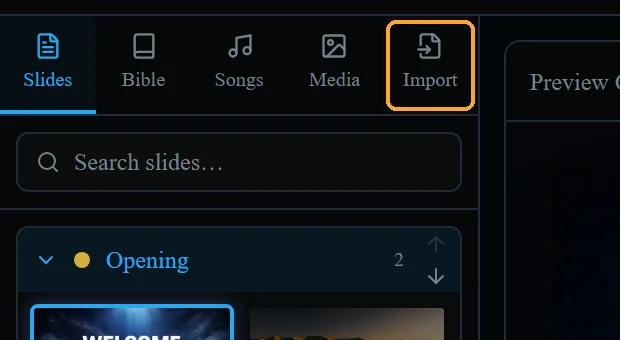
Your songs
Inside Import, the Songs tab offers three ways in. Use whichever matches what you are leaving.
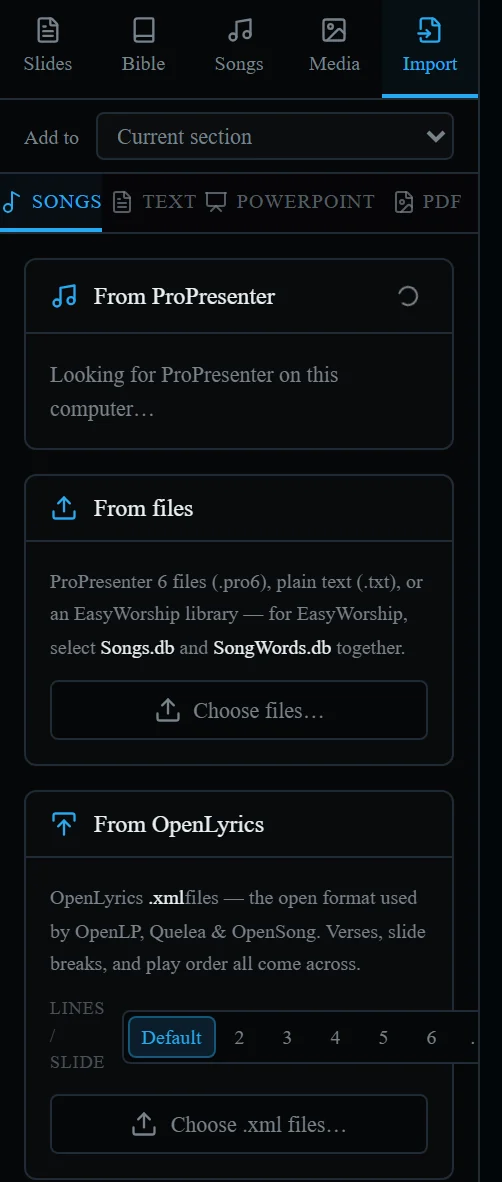
From ProPresenter, with ProPresenter running
The easiest one, and the one to try first. Aria talks to ProPresenter directly — no files to find, no exporting.
- Have ProPresenter running on the same computer as Aria.
- In ProPresenter: Preferences → Network → Enable Network.
- In Aria: Import → Songs. Your ProPresenter libraries appear, with the number of songs in each.
- Import one library, or all of them.
From files
- ProPresenter 6 — select the .pro6 files.
- EasyWorship 6 or 7 — select Songs.db and SongWords.db together. EasyWorship splits a library across those two files and one of them alone contains no lyrics.
- Plain text — .txt, with
[Verse 1]-style markers or just blank lines between stanzas. Every piece of church software can export this, so it is the way in from anything not listed here.
From OpenLyrics
.xml files, the open format OpenLP, Quelea and OpenSong export. Verses, slide breaks and the play order all come across.
Aria shows a report: how many songs it found, how many it imported, how many it updated, and every one it skipped with the reason. The songs land in Songs → Library and in a setlist named after the import — never in the setlist you are using on Sunday.
Aria looks for ProPresenter on this computer only. If it is running on the machine next to you, Aria cannot see it — copy the files across and use From files instead. If it is on this computer, the Network API is the thing to check: Preferences → Network → Enable Network, then press the refresh arrow in Aria.
Aria does not read those, on purpose — they are a closed format and a half-working reader would lose words without telling you. Two ways round it, both reliable: run ProPresenter 7 and use the live connection above, or export the songs as plain text and bring in the .txt files.
What comes across, and what does not
| Comes across | Does not |
|---|---|
| The words. Section labels (Verse 1, Chorus, Bridge). The arrangement — the order the sections are sung in. Titles and, where the file has one, the author. Slide breaks, from OpenLyrics. | Backgrounds, images, videos and motion. Fonts, colours and positioning. Timers, triggers and cues. |
That split is deliberate rather than unfinished. Your old software’s look belongs to your old software; in Aria the look is set once, in Layouts, and every song inherits it — so a library of a thousand songs does not arrive carrying a thousand different designs.
Your slide decks
Announcements, a sermon deck, a welcome loop. Two tabs, and which one you want depends on whether the design matters.
- PowerPoint takes a .pptx file and keeps the words, as editable Aria slides. Right when the deck is text on a plain background, and better than the alternative because you can still change the wording afterwards.
- PDF keeps the design, exactly. Save the deck as a PDF from PowerPoint, Keynote or Google Slides, and every page arrives as a full-screen picture — pixel for pixel what it looked like. You cannot edit the text afterwards, because it is a picture.
Both show you every slide with a tick box before anything is imported, so a forty-page deck does not have to arrive whole.
Already on Planning Center or SongSelect?
Those are not migrations — Aria connects to them and keeps working with them week to week. See Planning Center and SongSelect.
A sensible order
- Bring the song library in first — it is the biggest thing and the one that takes longest to redo by hand.
- Check a few songs in Songs → Library: right words, right section order.
- Set your look once in Layouts. Everything you imported picks it up.
- Bring in any decks you actually still use. Most churches find half of them were for a service that has already happened.
- Build your first service: Building your service.